
• Home
  • Features
  • Download
  • Shop
  • Support
  • Blog
  • Contact
[email protected]
Get nLite for XP
NTLiteNTLite
  • Home
  • Features
  • Download
  • Shop
  • Support
  • Blog
  • Contact

Blog

Recent news

Disk partition configuration feature

January 14, 2015 Posted by nuhi Documentation, Updates

In the latest build, new feature has been added to the Unattended page, the ‘Disk partition configuration’.
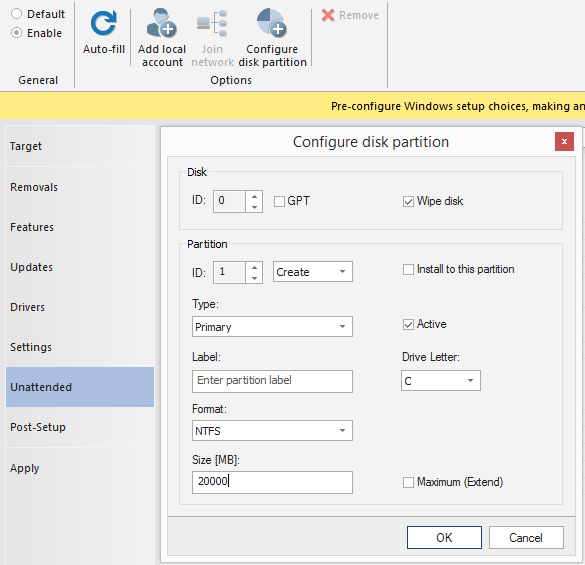
screenshot

It goes without saying, be very careful using this feature.
Depending on what you select, it can wipe your disk clean, create and format partitions, and install Windows to a partition without user interaction.
Let me highlight it again, these options can erase your disk by simply booting the image if you set it up to do so.
Of course people who requested such a feature will welcome it, as it speeds up deployment.

A lot of work went into the implementation, to be simple as a few clicks to setup while magic happens in the background, so it is for licensed users only.

If you get an error 0x80042565 during the initial Windows setup phase, that mostly means the auto-partition type was set to GPT (UEFI) and the setup was booted in MBR (BIOS) mode, or vice-versa.
Make sure those two are in sync, auto-partition type cannot be universal between UEFI and BIOS due to different partition schemes.

Enjoy, and be careful with the wipe option.

Share
22

You also might be interested in

Host Refresh and Install Updates wizards

Oct 6, 2016

Starting with the version 1.2, NTLite has additional tools on[...]

Tutorial for creating and testing a 700MB Windows 10 ISO

Feb 27, 2018

Some have asked for an updated guide for Windows 10,[...]

Power plan support

May 4, 2025

Starting with the version 2025.4, NTLite supports handling of Windows[...]

RSS Latest community posts

  • I need help
  • Windows Component Store (WinSxS) is needed to configure Features
  • Latest NTLite crashes during ESD compression
  • Component store is corrupt (W11 25H2)
  • [Solved] Domain Join seemingly not working?
  • Office365 Package and Silent Install
  • How can I add the March 2026 update to Windows 10 LTSC ISO without NTLite giving me an error?
  • Windows 10 Dark Theme Fix + Massive Tweak Pack
  • W11 Cumulative Updates (March 10, 2026)
  • Removing "Recommended" from Start Menu on Windows 11 22H2 Pro

© 2014-2026 Nlitesoft

  • Home
  • Features
  • Download
  • Changelog
  • Shop
  • Support
  • Documentation
  • Blog
  • Contact
  • Privacy Policy
Prev Next