
Hi
I am having trouble when creating the ISO file from an image.
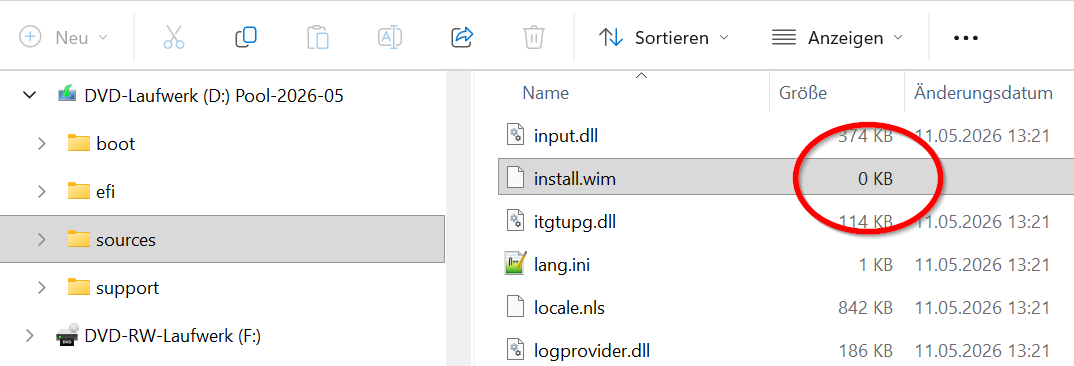
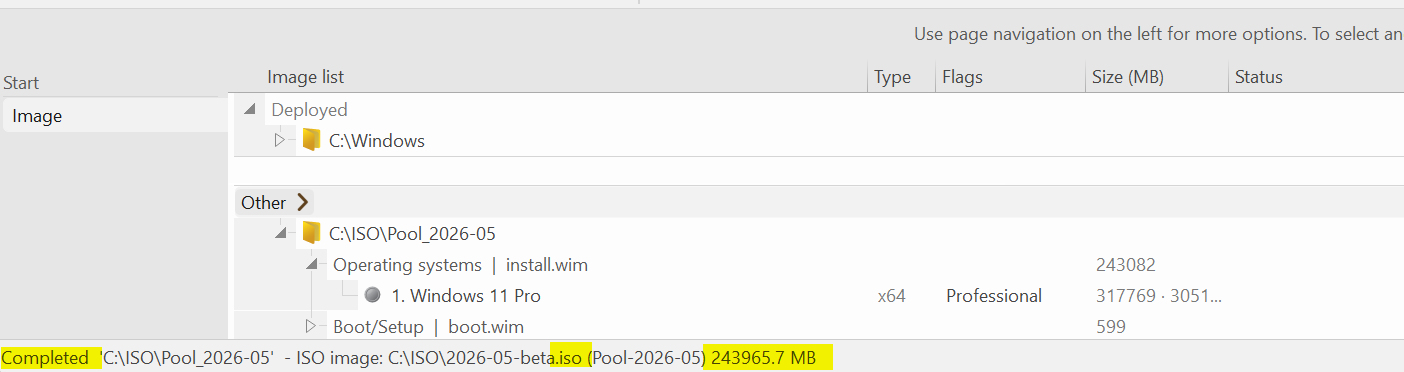
The \sources\install.wim seems to be empty, although the overall .iso is about 240 GB in size.
Any idea?
To explain: via sysprep audit I have created a huge installation, sysprep generalize oobe and dism wim capture. The workflow has worked fine over the years.
Still does until the point where ntlite is supposed to create an .iso file. No idea what is going on here. When opening the .iso with ultraISO and trying to manually add the correct install.wim to \sources\ I get prompted to change the ISO format, because the install.wim exceeds the file system's 4GB limit.
I am having trouble when creating the ISO file from an image.
The \sources\install.wim seems to be empty, although the overall .iso is about 240 GB in size.
Any idea?
Pasteboard - Uploaded Image
www.pasteboard.co
Pasteboard - Uploaded Image
www.pasteboard.co
To explain: via sysprep audit I have created a huge installation, sysprep generalize oobe and dism wim capture. The workflow has worked fine over the years.
Still does until the point where ntlite is supposed to create an .iso file. No idea what is going on here. When opening the .iso with ultraISO and trying to manually add the correct install.wim to \sources\ I get prompted to change the ISO format, because the install.wim exceeds the file system's 4GB limit.
Last edited:
